Saturday, 21 July 2012

How to Recover Data from a Crashed Hard Drive

Today, we will help you how to Recover Data from a Crashed Hard Drive. When your PC switch off suddenly due to any hardware failures or software error problems. If you are regular computer user; you may know that a hard drive failure is an unpredictable situation. It happens very often that your hard drive gets crashed and you ultimately lose you precious saved data and files leading to great discontentment and grief. It's really a worst condition when you are working on an important file or data or picture etc and suddenly everything gets blank and Oh God, your hard disk breaks down. And it becomes even more critical when you don't have any backup installed in your computer at all.

Though crashing hard drive means total data loss from your computer system but now with the advancements in IT technology, it has become possible to recover your data or file or work when the hard drive stops booting. There are various methods with which you can recover your important data and fix the problem at the ease of your own comfort without waiting for the technician to come. Here I am discussing how to recover your data from a crashed hard drive. Some times your pc may crash due to virus attacks. So in order to avoid such situtatuions you need to secure your pc with goodantivirus softwares.

The first step to be taken for solving the problem is to take out the crashed hard drivefrom the system. Then install this hard drive in another computer as a secondary drive having Windows installed on it. After it, boot into Windows and install PC Inspector File Recovery. The software is available at free of cost and we provided the download link of the application at the end of the article. But always install it on the primary drive to avoid the over-writing of files you are going to restore. After downloading the PC Inspector File Recovery, open it and select the language. The software is compatible for all windows versions xp/vista/7 and windows 8. A welcome screen will appear with having three options in it:
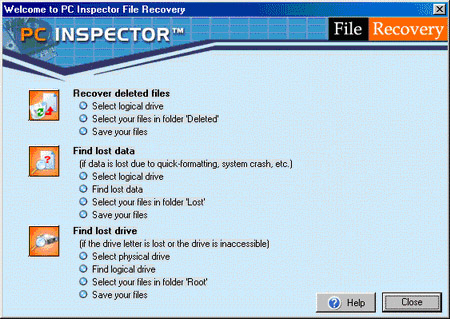
Recover deleted files

This option enables you to restore only those files which have been deleted permanently from your drive and have not been over-written yet.

Find lost data

By choosing this option, you will be able to recover the data which has been lost as a result of hard drive crash. With this option, you will further get two more options of "start cluster" and "end cluster". It's better to leave the scanning process of entire drive as it takes a long time depending on the size of your drive.

Find lost drive

It is the third option which should be used when you don't see your drive letter in my computer or windows explorer. This option will help you connect the drive and to find your lost data.

But in the case, if there is no secondary computer to work with, go for the Ultimate Boot CD for Windows. With the help of UBCD, you will be able to boot into Windows which will then run utilities on the damaged drive that will help you solve the issue. With UBCD, you gain an access to various utilities and PC Inspector File Recovery is also one of them which can be run on the system from a CD. For creating UBCD for Windows, you require a PC with Windows XP and XP Installation CD. To keep your crashed hard drive into the freezer is also a successful method to recover the data or files.Download Here

If all of the above mentioned methods not work, It's time to send your hard drive in the hands of a computer technicians who will use any data recovery tool or apps to help you recover your lost data successfully. However, you may also search for a data recovery software online and get it installed on your computer system.

Hard drive crash is a common problem that can happen with anybody at any time. So search for the right option and save your precious data and files from getting corrupted.

Ilya Elbert writes for several ITSupportDenver and Computer Repair Denver companies.

Download Link for PC Inspector File Recovery
 

Enjoy Guys! and don't forget to post your comments.

How to install windows 8

Downloading the 2.5GB ISO image from Microsoft's website took me about 20 minutes, although that time can extend based on your Internet connection. 
First up, a betta fish (because it's a beta, after all)

Now we move into the installation process:

You'll have to enter a product key, of course. What would Windows be without the Windows activation process? 
But instead of paying $200 for a license, all you have to do is grab the product key from the download page, as seen here:
Next, you'll agree to the Windows license terms, and select whether to do an upgrade or custom installation. The latter lets you choose which hard drive to use:
If you've installed Windows before, this screen will be quite familiar. This is the longest part of the installation, but it only took five minutes or so. 
After installation, you'll see another betta fish, and then you can start personalizing your computer, starting with giving it a name and choosing a background color. 
Now it's time to select installation settings.
If you select "custom," you'll go through options for sharing and connecting to devices; whether to automatically download updates and new device drivers; whether to send diagnostic information to Microsoft; whether to share information such as your name with applications; and whether to turn on the Windows Location Platform for location-based app settings. Here's an image of the settings for keeping your computer up to date and safe from viruses:
Now you can sign into the OS so that you can download applications from the new Windows Store and sync data across different computers. 
You'll be asked to enter a mobile phone number, alternate e-mail address, and security question, so Microsoft can help you reset your password if you can't log in. After signing in, you'll finally be looking at Microsoft's brand-new Metro interface for Windows 8: 
There's lots of stuff you can do in the Metro interface, such as accessing the Windows Store, and various applications such as Mail, SkyDrive, Photos, Internet Explorer, Xbox Live Games, and more. But if you find Microsoft's new tile-based setup overwhelming, you can switch back to the traditional desktop interface: 
And now you've seen the Windows 8 installation process. 
Enjoy Guys! and don't forget to post your comments.

How to watch online TV


If you are never experienced Mobile TV on your smart phone yet, here is a chance to enjoy 20 TV channels on the move. It is offered by Ditto TV that delivers Live TV, Video-on-Demand, Music, News and much more on your mobile phones, tablet, desktops, laptops and other hand held devices.


 Ditto TV is another platform first from Zee Entertainment Enterprises Limited (ZEE), one of India's leading television, media and entertainment companies.   Ditto TV offers you a Quality Video Viewing that is adapted especially to suit range of internet speed. This means that you can watch Ditto TV using 3G, Wi-Fi and broadband.


The free trial will allow you to watch all offered Live channels for 10 minutes in total, after that you may fully register with DittoTV and will receive another 48 hours of ETC and Zee news for free! Later on, you are able to watch ETC for 5 minutes a day without any costs. Currently, the DittoTV service is only available in India..


DittoTV is available on Android smartphones and tablets (Android v2.2 and v2.3), on all iOS devices (iOS 4.x and 5), on Blackberry devices and on PC and Mac desktop computers. If your internet connection is faster then 100kbit/s then you are ready to go! For an optimum viewing experience 3G mobile access or fixed line capacity will be needed. If your Internet speed is below this, DittoTV will still work but quality may be reduced.The DittoTV app for Android and Mac/PC requires Adobe Air to be installed on the device. 
To Download Ditto TV, Click here
To Know more about how Ditto TV works on your device, Click here
For FAQs - Frequently Asked Questions, Click here

Enjoy Guys! and don't forget to post your comments.

How to Create your own Mobile Themes with software

Today our post is on how to create your own themes for your mobile try this software now..

    Main features include:
  1. 12 theme templates, with application icons also!
  2. Can add 2 photos! One for idle screen background and one for menu background
  3. Can change text color of title and content. 40 different colors are provided.
  4. Support 8 languages: German, Italian, French, Portuguese, Spanish, English, Trandition Chinese, Simplified Chinese
The only software that lets you create your own personal theme right on your Nokia S60 phone! All is done in a few minutes! Pick any photo, choose from 12 theme templates, store up to 6 personalized themes, and bring a new look on your phone instantly. Changing theme has never been more easy and fun! It's really a must-have for every S60 phones.
      Features include:
  1. Save up to 6 personal themes.
  2. Provide 12 theme templates with different style and color to suit your needs.
  3. Edit name of the themes created.
  4. Apply 2 photos as theme backgrounds.
  5. Provide "Fade Out" and "Blur" effect on the menu background. So you can read menu text easier.
  6. Apply music file as the theme's ringtone.
  7. Select text color for title and content.
  8. 2-day free trial.
CLICK HERE TO DOWNLOAD

Top 16 Most Expensive Materials In The World


expensive 013 Top 16 Most Expensive Materials In The World
16 Most Expensive Materials in the World Top 16 Most Expensive Materials In The World
expensive 021 Top 16 Most Expensive Materials In The World
expensive 031 Top 16 Most Expensive Materials In The World
expensive 041 Top 16 Most Expensive Materials In The World
expensive 051 Top 16 Most Expensive Materials In The World
expensive 071 Top 16 Most Expensive Materials In The World
expensive 082 Top 16 Most Expensive Materials In The World
expensive 091 Top 16 Most Expensive Materials In The World
expensive 101 Top 16 Most Expensive Materials In The World
expensive 112 Top 16 Most Expensive Materials In The World
expensive 122 Top 16 Most Expensive Materials In The World
expensive 132 Top 16 Most Expensive Materials In The World
expensive 143 Top 16 Most Expensive Materials In The World
expensive 152 Top 16 Most Expensive Materials In The World
expensive 163 Top 16 Most Expensive Materials In The World
expensive 062 Top 16 Most Expensive Materials In The World
Enjoy Guys! and don't forget to post your comments.

Download Free Norton Antivirus, Internet Security Beta 2013

Symantec has released Norton AntiVirus 2013, Norton Internet Security 2013 and Norton 360 2013 for public beta testing. Norton 2013 betas products will also support Windows 8 Consumer Preview versions and existing platforms. 

New Features in Norton Beta 2013 Products:

  • The 2013 products will all have a touchscreen-friendly user interface. “Whatever you did with a mouse, now you can also do with your index finger.
  • The 2013 beta versions will support Windows 8 pre Release versions.
  • The 2013 products will take advantage of Microsoft’s new ELAM (Early Launch Anti-Malware) drivers for protection during the boot process. By using ELAM, the Norton products can control initialization of other drivers and suppress malicious drivers, rootkits, and other tough threats.
  • The new user interface in beta 2013 versions will take advantage of hardware graphics acceleration.
  • Norton software updates, even major ones, will happen without any user interaction and without a reboot.
  • Norton Power Eraser serves to eliminate persistent malware threats that may prevent installation of Norton products

Download beta versions of Norton 360 2013, Norton Internet Security 2013, and Norton AntiVirus 2013 :

Just head over to Norton beta 2013 versions download page and download the Norton 360 2013, Norton Internet Security 2013, and Norton AntiVirus 2013.
Prior to download you have to complete the registration of these free public beta versions download, you will be emailed a 14-day Beta Subscription Activation Key to assist you in testing. Once the Beta Subscription expires, check for the latest builds available. You will then be able to download the new build, and receive a new 14-Day Beta Subscription Activation Key.

Direct Links:


Enjoy Guys! and don't forget to post your comments

chitika